Quickly modify the edges of any STL.
Chamfers · Fillets · Hybrid Chamfillets
No upload. No installation. No account. No cloud processing.
Choose your STL, pick the edges, choose your finish, and export.
It only takes seconds.
The Mesh Editing Trap
We all routinely download STLs from MakerWorld, Printables, or Thingiverse, only to realize...
The traditional answer is often to boot up Fusion, FreeCAD, Blender, or Meshmixer. But that's enormous overkill for a single-operation modification.
Mesh editing is particularly unpleasant for this task. Fusion is excellent at parametric CAD, but an imported STL isn't a native parametric solid. Once you're dealing with mesh geometry, operations that feel trivial on a native CAD model quickly become a frustrating mess.
The Chamfilletizer fixes this. It treats your STL as exactly what it is—a mesh—and applies flawless, slicer-ready edge treatments in seconds.
How to Use The Chamfilletizer
This is intended to be a "pretty good" tool for applying simple chamfers, fillets, and hybrid chamfillets to basic STL files. It is a quick-fix for the most common applications rather than a silver bullet for highly complex meshes.
- Load a Model: Select your STL. The app will automatically repair minor mesh issues and center the camera.
- Select Edges: In Global mode, the threshold slider picks all sharp edges. Switch to Selective mode to click specific edges, or use the selection macros. (Tip: double-click to select connected edges).
- Configure Cut: Choose Standard Chamfer, Pure Fillet, or Hybrid Chamfillet. Adjust the size and ratio using the live cross-section preview.
- Queue & Execute: Click "Add to Queue" to prep the cut. Add multiple cuts if needed, then click "Execute Queue" to process the geometry.
- Export: Click "Export STL" to save your modified, slicer-ready mesh.
Selection Macros
- Base Edges: Selects only edges sitting flat on the build plate (fights elephant's foot).
- All But Base: Selects everything except the build plate edges.
- Top Edges: Selects edges at the absolute highest point of the model.
- Verticals: Selects straight up-and-down edges (rounds sharp box corners).
- Horizontals: Selects any edge parallel to the floor, regardless of height.
Cutter Previews & Warnings
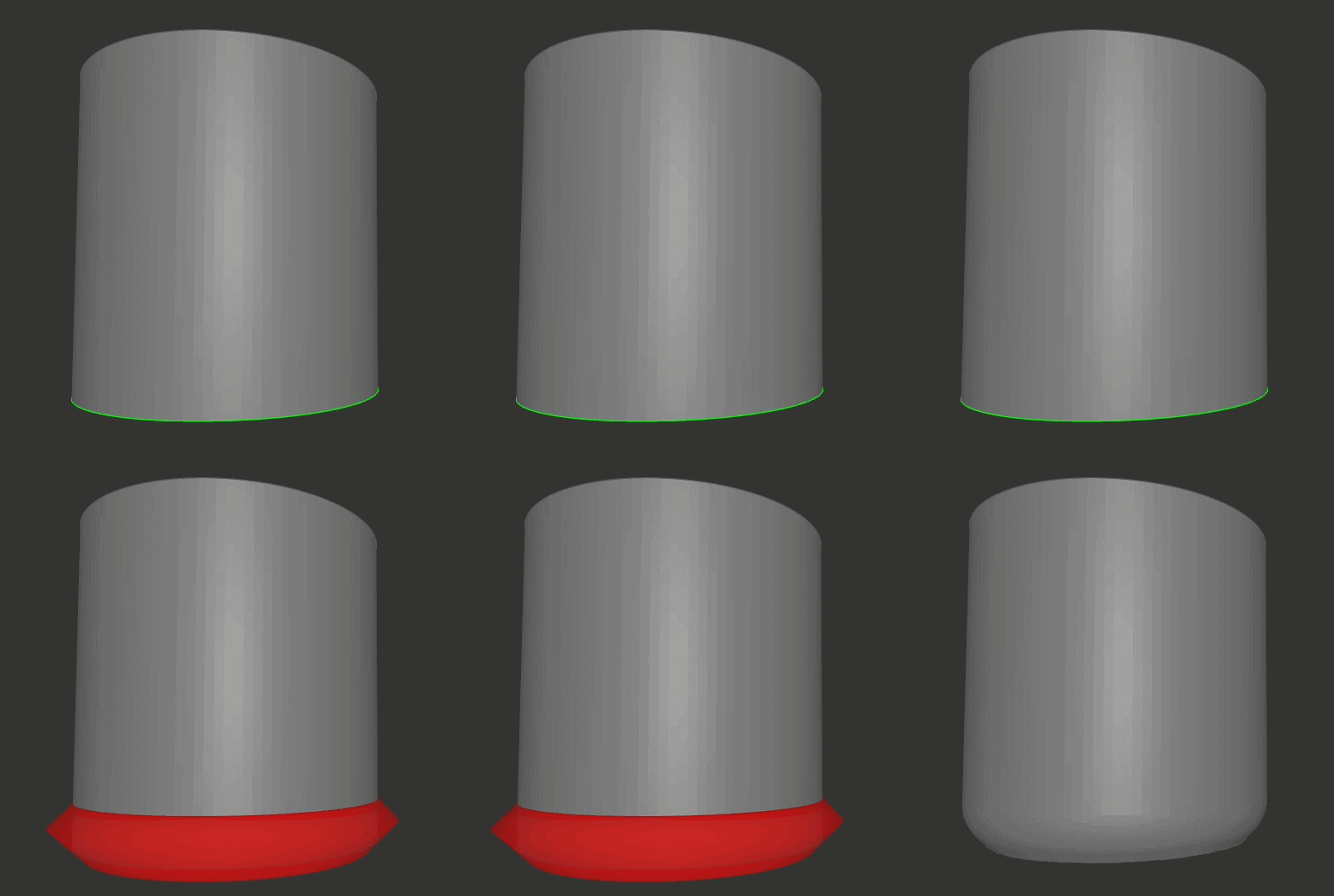
When you add an operation to the queue, a 3D preview of the cutting tool appears on your model.
- Green — Safe: The cutter fits comfortably within the selected geometry.
- Yellow — Warning: The cutter may be too large for a tight corner or may extend into neighboring geometry.
A warning does not automatically prevent execution, but you should inspect the result carefully in your slicer before printing.
Stopping at Flat Surfaces
If a cut runs directly into a flat surface, the cutting tool automatically trims itself at that surface before making the cut—regardless of which direction the surface faces.
What works:
- Floors and flat platforms
- Ceilings and overhangs
- Vertical walls
- Sloped surfaces like ramps and roofs
- Any other flat surface that touches the open edge directly
What doesn't work:
This is not full collision detection. It will likely fail on curved surfaces, objects nearby that aren't directly touching, corners where multiple faces meet awkwardly, or messy/broken 3D models (STL files with bad geometry).
Under the Hood
The Chamfilletizer uses a robust, client-side geometry engine to ensure your exported STLs are manifold, printable, and mathematically sound.
Complete Workflow
- Auto-Cleaning: Automatically welds and cleans meshes upon loading.
- Smart Selection: Global threshold angles, individual edge picking, and double-click chain selection.
- Selection Macros: Instantly grab Base Edges, Top Edges, Verticals, or Horizontals.
- Live Previews: Three distinct edge profiles with visual cross-section previews.
- Batch Processing: Queue multiple operations and execute them at once.
- Non-Destructive: Full undo support for your last operation.
- Direct Export: Saves the finished mesh directly as a binary, slicer-ready STL.
Advanced Mesh Operations
- True Booleans: Actual modifications are performed using precise boolean unions and subtractions.
- Sweep & Frame Generation: Dynamic path classification handles shallow turns, miters, and bounded corners with automatic pullback.
- FDM Gravity Orientation: Profiles automatically orient flat edges toward the build plate.
- Error Prevention: Detects failed/unsafe sweeps and prevents degenerate triangles rather than blindly outputting broken geometry.
- Complex Topology: Native handling for closed loops, dynamic normals, and seamless manifold conversion.
Frequently Asked Questions
What The Chamfilletizer Is Not
The Chamfilletizer is an edge-treatment tool, not a full CAD system. It is designed for localized chamfers, fillets, and hybrid chamfillets on existing STL models.
It does not provide CAD-style sketches, constraints, parametric feature history, or complete surface-editing capabilities.
- It does not rebuild or remodel your part.
- It does not guarantee success on every complex or curved edge.
- It does not reliably handle every extremely tight corner.
- It does not repair serious holes, self-intersections, or non-manifold topology.
- It does not replace a full CAD chamfer or fillet feature.
- It does not fix your significantly damaged model.
What happens when a cut runs into a flat surface?
If an open edge runs directly into a flat face, the cutting tool automatically trims itself at that surface before making the cut—regardless of which direction the surface faces.
This protects floors, ceilings, walls, ramps, and other flat stops so the cut stops clean instead of carving into them.
Keep in mind this is deliberately simple, not full collision detection. It won't reliably handle curved surfaces, parts that don't directly touch the edge, tight corners where multiple faces meet awkwardly, or broken mesh geometry. The untrimmed cutter will still appear in the preview.
What kind of models work best?
Functional, mechanical parts. If you are modifying a simple bracket, a cable winder, or a modular storage crate, this tool works great. Highly organic models may have too many intersecting faces for the edge-cutters to resolve cleanly.
Why is a cut failing or taking so long?
Processing is done entirely locally in your browser. High-polygon STLs take longer to calculate. If the tool detects that a cutter would fold over itself or cannot safely complete the operation, it may skip that cut. Try a smaller treatment size.
A yellow cutter warning may indicate one of two common problems:
- Lateral Spillover: The cutter is wider than the nearby faces and may clip adjacent geometry.
- Path Overlap: The cutter is too large for the local corner or curve and may fold or overlap.
What is a "chamfillet"?
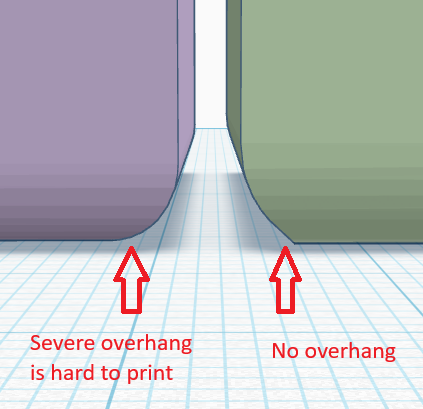
A chamfillet is a hybrid edge treatment combining a chamfer and a fillet, designed specifically for FDM 3D printing. Standard rounded fillets create extreme overhangs that print poorly. A chamfillet solves this by starting with a straight, printable chamfer at the base, which smoothly transitions into a curved fillet. This provides the aesthetic of a rounded bottom edge without requiring support material.
Why did my model disappear?
Your original STL must be manifold (watertight). If the mesh has holes, non-manifold edges, or severe self-intersections, the boolean math will fail. Repair the STL in your slicer or CAD software first.
Is my data sent anywhere?
No. The entire application runs locally using WebAssembly. No STLs are ever uploaded to a server.
Support the Creator
If The Chamfilletizer made your life easier, buy me a Diet Coke or boost my models. I appreciate your support!
Feedback & Bug Reports
Have a bug report, feature request, or just want to share a successful print?